Converter
Documentation PDFSection 0: Licensing
NIC is licensed under a Creative Commons Attribution-NonCommercial-NoDerivs 4.0 Unported License. For a full copy of the license and terms, see https://creativecommons.org/licenses/by-nc-nd/4.0/ .
Section 1: Uses
The software is intended to be used for the conversion of data files obtained from electroencephalography (EEG) in the European Data Format Plus Annotations (EDF+) into the Cloudwave Signal Format (CSF). CSF is intended to provide better human readability (based on JavaScript Object Notation), ease of computation with the companion CSF Computational Tool, and adaptability for use with parallel processing techniques.
Section 2: Requirements
- Java SE 8 or higher is required to run the software; Java SE 10 is available here.
- The software requires Javax JSON and Apache Commons Math JAR files. These should be contained in the JAR file for the converter. However, if there are issues, the required JAR files can be downloaded locally and added to the classpath during execution.
- EDF files should be separated into directories with one directory per patient.
Section 3: Setup
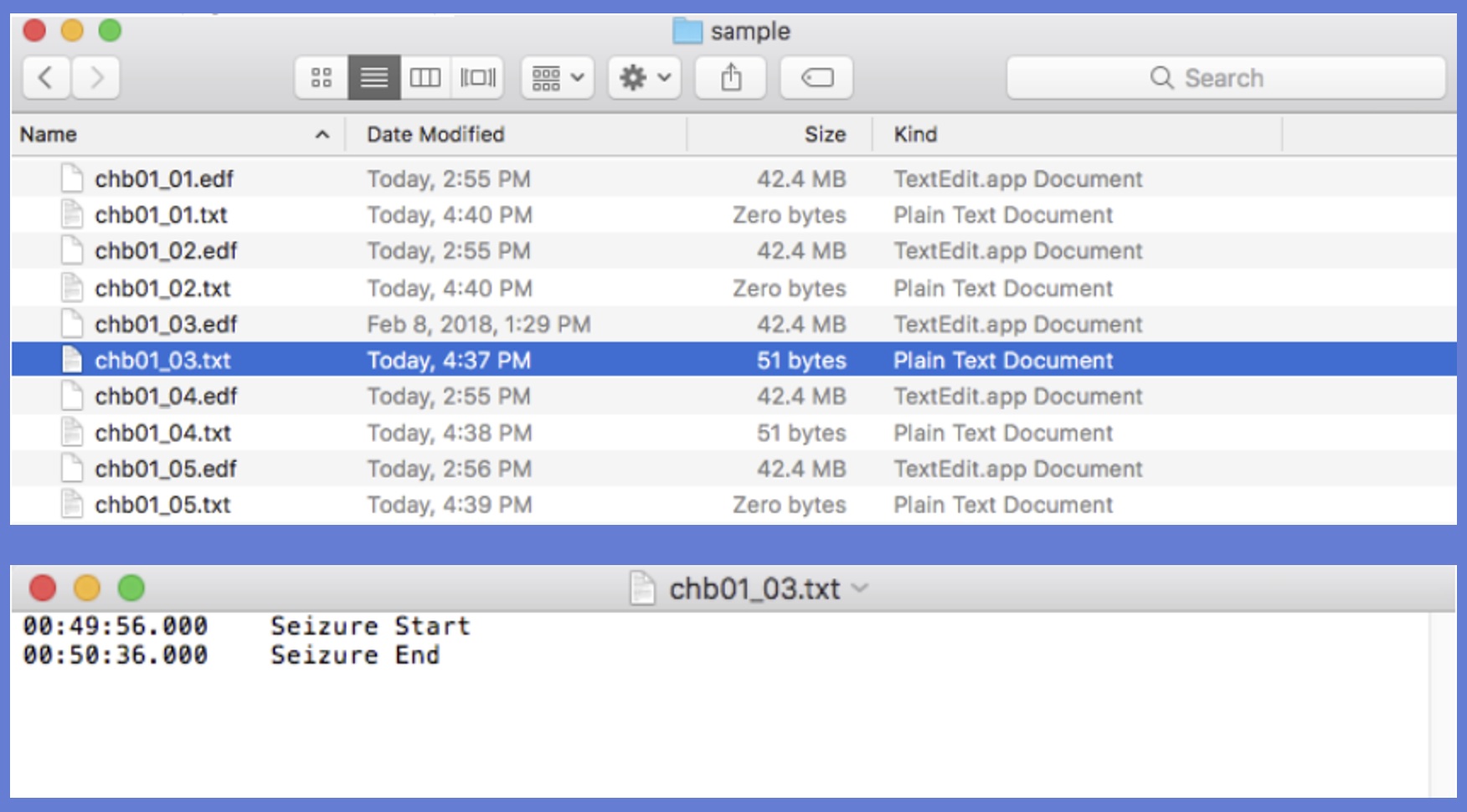
The folder must consist of EDF files (e.g., myEdf.edf) with corresponding annotation text files of the same name (e.g., myEdf.txt).
(Note: The EDF files being used are from the CHB-MIT Scalp EEG Database, which is publicly available through the PhysioBank website.)
These text files must conform to the EDF+ specifications -- that is, they must be in a two-column format with the first column being an offset timestamp from the beginning of the file (the preferred format is HH:MM:SS.SSS), and the second column is a text annotation string. The file may indeed be empty (note that chb01_01.txt contains zero bytes), but it must exist.
Section 4: Invocation
From the command line, navigatie to where EDFConverter.jar is located and enter:
java -jar EDFConverter.jar {EDF directory} {CSF directory} {fragments} {epochs}
with the following arguments:
- EDFdir (mandatory): The String filepath of the directory containing the EDF files to be processed
- CSFdir (mandatory): The String filepath of the directory in which output CSF files will be placed; if the directory does not currently exist, it will be created
- Fragments (optional; default 2): The integer that represents the maximum number of fragments to be included in each output CSF file
- Epoch (optional: default 30.0): The floating point value that represents the maximum time duration of each fragment in a CSF file
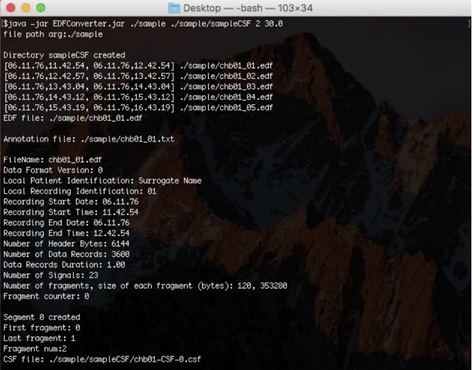
The program will begin by locating the destination folder for the CSF files, and creating it if it does not already exist. It will then sort the EDF files into chronological order. Then the program will process the EDF files in order, obtaining the EDF file and the associated annotation text file, and thereby create the corresponding CSF files. The program prints header information for each EDF file (this is for verification purposes) and summary statistics about the creation of each CSF file. The program will continue in this manner until all of the EDF files have been processed.
Section 5: Output
The output will be a directory populated with CSF files resulting from the processing of the directory of EDF files. The names of the CSF files are of the form myEDF-CSF-#.csf, where myEDF is the name common to the EDF files that occurs before the first underscore character, and the numbering of the files is chronological beginning at 0 (the EDF files are sorted chronologically before processing). Information about the correspondence between CSF files and EDF files is contained within the CSF files themselves, and is therefore not reflected in the filenames.
Credits
This software has been developed at Case Western Reserve University as part of a research project and includes contributions by the NIC development team members: Arthur Gershon, Pramith Devulapalli, Vimig Socrates, Haroon Khazi, and Satya Sahoo (Project PI).
Correlator
Documentation PDFSection 0: Licensing
NIC is licensed under a Creative Commons Attribution-NonCommercial-NoDerivs 4.0 Unported License. For a full copy of the license and terms, see https://creativecommons.org/licenses/by-nc-nd/4.0/ .
Section 1: Uses
The software is intended to be used for the computation of pairwise measures of correlation among electrode readings obtained from electroencephalography (EEG). The current measures computed by the software are nonlinear correlation coefficient developed by Pijn et al. (Pijn et al., 1990), phase coherence developed by Mormann et al. (Mormann et al., 2000), and Pearson’s linear correlation coefficient. Additional functional connectivity measures will continue to be added to the NIC workflow. The program reads EEG data stored in files in the Cloudwave Signal Format (CSF), preferably generated by the companion NICConverter tool.
Section 2: Requirements
- Java SE 8 or higher is required to run the software; Java SE 10 is available here.
- The software requires Javax JSON and Apache Commons Math JAR files. These should be contained in the JAR file for the converter. However, if there are issues, the required JAR files can be downloaded locally and added to the classpath during execution.
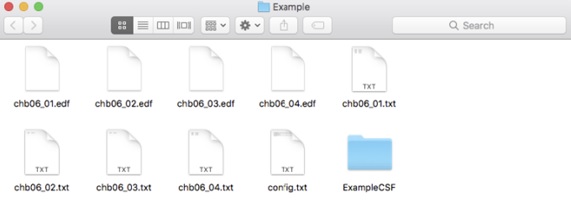
- CSF files should be separated into directories with one directory per patient. CSF files do not need to be located in the same directory as the EDF files; it is simply done here for convenience. (The EDF files used in this example were taken from the CHB-MIT Database that is publicly available on PhysioNet.)
Section 3: Single Event Processing
Section 3.1: Invocation
From the command line, navigate to the location of the jar file and enter
java -jar NICCorrelator.jar {CSF directory} {results filepath} {start} {end} {lag} {measure list} {channel list}
with the following mandatory arguments:
- CSF directory: The String filepath of the directory in which the CSF files to be analyzed are located
- Results: the String filepath of the output text file
- Start:The String representing the start time of the event, in the form DD.MM.YY,hh.mm.ss
- End:The String representing the end time of the event, in the form DD.MM.YY,hh.mm.ss
- Lag: The floating point value representing the maximum possible displacement of time (forward and backward) in which to compute correlation
- Measure List: The String representing the comma-separated list of names of measures to be considered; current options include ALL, PEARSON, PHASE, and PIJN.
- Channel List:The String representing a comma-separated list of channels that will be analyzed
The program will then automatically loop through the coupling measures indicated, in the order PIJN, PHASE, and PEARSON, and print the values to the screen for observational purposes.
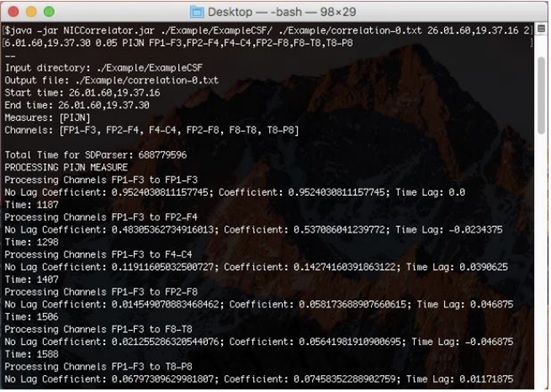
Section 3.2: Output
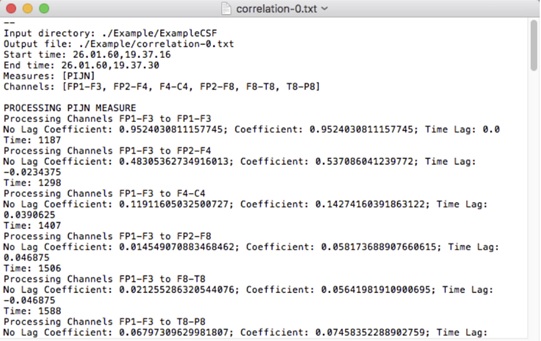
The output of the program will be a text file in the location indicated by the results parameter. The text file is prefaced by a labeled list of the input parameters -- this is for verification purpose. The text file contains sections corresponding to the measures indicated in the order PIJN, PHASE, PEARSON. The sections will include the data printed to the screen during runtime, in addition to three comma-separated matrices that contain the maximal correlation values over the window, the times at which the maximal values occur, and the z-scores of the maximal correlation values, normalized over their collective average and standard deviation.
Credits
This software has been developed at Case Western Reserve University as part of a research project and includes contributions by Arthur Gershons and Satya Sahoo (Project PI).
Network Analysis
Documentation PDFSection 0: Licensing
NIC is licensed under a Creative Commons Attribution-NonCommercial-NoDerivs 4.0 Unported License. For a full copy of the license and terms, see https://creativecommons.org/licenses/by-nc-nd/4.0/ .
Section 1: Uses
Section 2: Requirements
- Java SE 8 or higher is required to run the software; Java SE 10 is available here.
- The software requires Javax JSON and Apache Commons Math JAR files. These should be contained in the JAR file for the converter. However, if there are issues, the required JAR files can be downloaded locally and added to the classpath during execution.
- CSF files should be separated into directories with one directory per patient. CSF files do not need to be located in the same directory as the EDF files; it is simply done here for convenience. (The EDF files used in this example were taken from the CHB-MIT Database that is publicly available on PhysioNet.)
Processing
Credits
This software has been developed at Case Western Reserve University as part of a research project and includes contributions by Arthur Gershons and Satya Sahoo (Project PI).
Topological Data Analysis
Documentation PDFSection 0: Licensing
NIC is licensed under a Creative Commons Attribution-NonCommercial-NoDerivs 4.0 Unported License. For a full copy of the license and terms, see https://creativecommons.org/licenses/by-nc-nd/4.0/ .
Section 1: Uses
This software is intended to be used to create and explore Vietoris-Rips Complexes from the correlation matrices obtained using the NIC Correlator. All data cleaning steps are handled internally; thus, input files are expected to be in the format of those output by the NIC Correlator. All persistent homology computation is handled using Inria’s GUDHI.
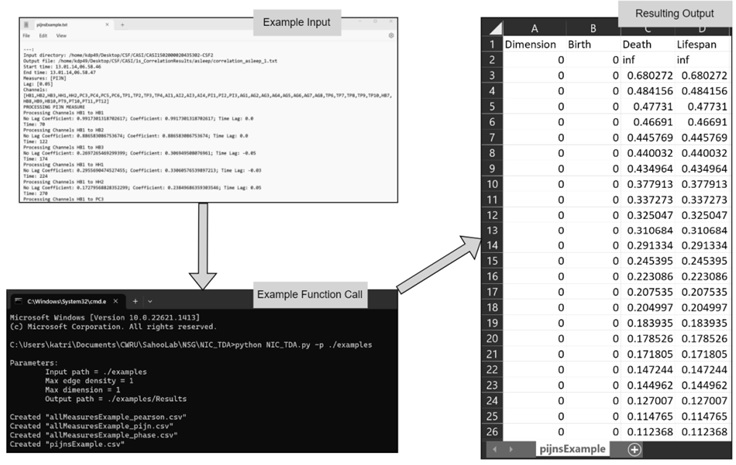
This program reads correlation matrices output by the NIC Correlator to generate a list of simplicial complexes, their dimension, their birth filtration, their death filtration, and their persistence or lifespan value. A single csv is output for each correlation matrix processed.
Section 2: Requirements
A requirements.txt file is provided for your convenience so that you may install all dependencies in a virtual environment from the terminal using the command pip install -r requirements.txt. It is recommended, but not necessary, that this setup is done within a virtual environment for optimal package version control. All development was conducted using python version 3.9.4.
The required python dependencies are as follows:
- python ≥ 3.8.12
- pandas ≥ 1.5.2
- gudhi ≥ 3.7.1
Text files output by the correlator are generally expected to all be in one directory, with one patient per directory. They do not need to be in the same directory as EDF files or CSF files. All files within a given directory will be analyzed unless a specific file name is specified. For simplicity, all output files are in csv format and share the same name as the txt file which was used to generate them.
Section 3: Processing
From the command line, navigate to where the python project is stored and enter:
python3 NICTDA.py -p {input path} -f {file} -o {output path} -e {max edge density} -d {max dimension}
with the following mandatory arguments:
- Input Path (mandatory): The path to the folder containing any correlation matrices (output by the NIC Correlator) that you would like to process.
- File (optional): The name of a single file within the provided input folder if you would like to limit your processing to single-file processing. This should not include the full file path as the path has already been specified.
- Output Path (optional: default = "{input path}/Results"): : The path to a folder to store your results. If no folder is provided, a folder called “Results” will be created inside of the specified input path. If a “Results” subdirectory already exists, you will be prompted for further action.
- Max Edge Density (optional: default = 1.0): The floating-point value that represents the maximum edge density to be used by GUDHI. Since all inputs in a correlation matrix are less than 1, the default is set to 1.0. For more information, see additional GUDHI documentation here.
- Dimension (optional: default = 1): : The integer value representing the maximum dimension (non-inclusive) of the simplices to be returned by GUDHI. For more information, see additional GUDHI documentation here.
The program will begin by locating the destination folder for the text files holding correlation matrices. For observational purposes, the input parameters will be output to the screen. Each file within the provided folder will be processed using GUDHI’s Vietoris-Rips Complex functions to generate a list of the dimension, birth filtration, death filtration, and lifespan value of all simplicial complexes in the provided data up to the given dimension.
Credits
This software has been developed at Case Western Reserve University as part of a research project and includes contributions by Katrina Prantzalos and Satya Sahoo (Project PI).